 MM Huq 17 min read

Most "free online tools" have a catch: an upload you didn't want, an account wall after the third use, or a watermark on the result. The Curator's FREE Tools take a different approach. There are 278 of them, from PDF merging and image compression to mortgage maths and JSON formatting, and every single one runs inside your browser tab. Nothing you paste or open is sent to a server, so a tax document, a family photo or an API token stays on your device.
This guide is the map. It walks through all 6 categories, shows what each tool looks like in action, points you to the best place to start, and explains the small habits that make these tools faster than reaching for an app. Bookmark it — new in-depth articles on individual tools and multi-tool workflows follow every few days.
Why browser-based tools are different
A browser-based tool downloads a small program once, then does the work with your own computer or phone. That has three practical consequences. First, privacy: the file never leaves the tab, which matters for contracts, IDs, payslips and anything with personal data. Second, speed: there is no upload or download wait, so a 20 MB image compresses in about the time it takes to open it. Third, reliability: once the page has loaded, many tools keep working on a patchy connection.
| Question | Typical "free online tool" site | The Curator FREE Tools |
|---|---|---|
| Where is my file processed? | Often uploaded to a remote server | In your browser tab, on your device |
| Account or email required? | Frequently, after a few uses | Never |
| Daily usage caps or watermarks? | Common on the free tier | None |
| Works offline once loaded? | Rarely | Most tools, yes |
| Explains the method behind the result? | Sometimes | Every tool has a written guide and FAQ |
How to get the most out of them
- Use the search box and category pills on the FREE Tools page to jump straight to a task.
- Read the short guide under each tool once — it explains the method, so you can trust the number or file you get back.
- Chain tools: resize then compress an image, or convert CSV to JSON then format it. The workflow articles in this series show the best chains.
- Check the FAQ for limits. Very large files can be slow on older phones, and every guide says so plainly.
PDF tools (13)
Merge, split and build PDFs without uploading them anywhere.
PDF is the closest thing the internet has to digital paper. A PDF file describes every page as a fixed canvas, which is why it looks the same on a phone, a laptop and a printer. That fixed layout is also why PDFs are awkward to edit: the format was designed to preserve a page, not to rearrange it.
Our PDF tools work directly on the page objects inside the file. Merging copies pages from several documents into a new one; splitting copies a chosen range into its own file. Nothing is re-rendered or re-typed, so text stays selectable and images keep their original quality. Everything happens inside your browser using the open-source pdf-lib library — your contracts, invoices and scans never travel to a server.

Start here
- Merge PDF — Combine several PDFs into one file, in the order you choose.
- Split PDF — Extract a page range from a PDF into a new file.
- JPG to PDF Converter — Turn one or more photos or scans into a single PDF.
- Rotate PDF — Turn sideways or upside-down PDF pages the right way up — all pages or just some.
- PDF to JPG Converter — Turn every page of a PDF into a sharp JPG image.
What people use them for
- Combining a scanned contract with its signed signature page before emailing it to the other party.
- Pulling a single chapter out of a long report so a colleague only receives the pages they need to review.
- Turning phone photos of receipts into one PDF for an expense claim or a tax return.
- Bundling several invoices for a month into one file for your bookkeeper or accountant.
See all 13 pdf tools
Image tools (32)
Convert, compress, resize and create images right on your device.
Most image problems come down to three things: the format (JPG, PNG, WebP), the pixel dimensions, and the compression level. JPG is great for photos because it discards detail the eye barely notices. PNG is lossless and supports transparency, which makes it ideal for logos, screenshots and diagrams. WebP is a newer format from Google that is usually smaller than both, but some older apps still refuse to open it.
These tools use the drawing canvas built into every modern browser. Your image is decoded locally, redrawn at the size or format you choose, and handed back as a download. Because nothing is uploaded, they work offline once the page has loaded and they are safe to use with personal photos and ID scans.

Start here
- Image Compressor — Shrink JPG, PNG and WebP file sizes without uploading.
- Image Resizer — Resize images to exact pixel dimensions or a percentage.
- WebP to JPG Converter — Convert WebP images to JPG so they open everywhere.
- QR Code Generator — Make free QR codes for links, text, Wi-Fi and contacts — no sign-up, no expiry.
- Favicon Generator — Create favicon and app-icon PNGs in every standard size from one logo.
What people use them for
- Shrinking product photos so an online shop or marketplace listing loads quickly on mobile phones.
- Resizing a portrait to the exact dimensions a passport, visa or job-application form demands.
- Converting WebP images saved from websites into JPG so that older software and printers accept them.
- Creating a QR code for a restaurant menu, a Wi-Fi network, an event poster or a business card.
See all 32 image tools
- Image Compressor
- Image Resizer
- PNG to JPG Converter
- JPG to PNG Converter
- WebP to JPG Converter
- QR Code Generator
- Rotate & Flip Image
- Black & White / Sepia Image Filter
- Image to Base64 Converter
- Favicon Generator
- Image Colour Picker
- HEIC to JPG Converter
- QR Code Scanner from Image
- Crop Image
- JPG & PNG to WebP Converter
- Aspect Ratio Calculator
- Placeholder Image Generator
- SVG to PNG Converter
- Invert Image Colours
- Round Image Corners
- Add Border to Image
- Image Pixelator
- Meme Generator
- Image to ASCII Art
- Image Color Palette Extractor
- Blur Image
- Sepia Image Filter
- Image Brightness & Contrast
- Black & White Image Threshold
- Sharpen Image
- Posterize Image
- Image Dimensions Checker
Text & writing tools (48)
Count, clean, compare and reformat text in a click.
Writers, students, marketers and developers spend a surprising amount of time doing mechanical things to text: counting words for a brief, fixing an accidental caps-lock paragraph, removing duplicate lines from an export, or spotting what changed between two drafts. None of these tasks need artificial intelligence — they need a precise, predictable tool.
Every text tool here runs instantly as you type and never stores what you paste. That makes them suitable for unpublished manuscripts, client copy and confidential notes. Where a tool makes a judgement call — such as how it defines a 'word' or a 'sentence' — the guide below explains the rule so you can trust the number you report.
Start here
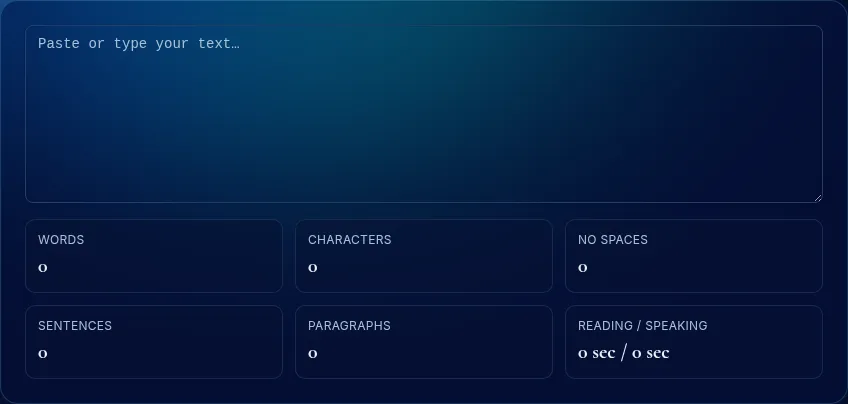
- Word Counter — Count words, characters, sentences and reading time as you type.
- Text Compare (Diff Checker) — Compare two texts line by line and highlight what changed.
- Readability Score Checker — Flesch Reading Ease and grade level for any paragraph.
- Emoji Picker & Copy — Search hundreds of emoji and copy them with one click.
- Text to Speech Reader — Have any text read aloud with your browser's voices.
What people use them for
- Checking an essay, cover letter or grant application against a strict word or character limit.
- Comparing two versions of a contract clause or policy to see exactly what the other side changed.
- Cleaning a mailing list exported from several sources so nobody receives the same email twice.
- Turning article titles into clean, readable URL slugs when publishing posts in a content system.
See all 48 text & writing tools
- Word Counter
- Case Converter
- Text Compare (Diff Checker)
- Remove Duplicate Lines
- URL Slug Generator
- Lorem Ipsum Generator
- Sort Lines Alphabetically
- Find and Replace Text
- Remove Extra Spaces
- Reverse Text
- Add Line Numbers
- Word Frequency Counter
- Text to Binary Converter
- Morse Code Translator
- Number to Words Converter
- HTML to Plain Text
- Caesar Cipher & ROT13
- Readability Score Checker
- Remove Line Breaks
- Email & Link Extractor
- Word Wrap Tool
- Anagram Checker
- Palindrome Checker
- Text Repeater
- NATO Phonetic Alphabet Converter
- Upside Down Text Generator
- Strikethrough & Underline Text
- Acronym Generator
- Word Scrambler
- Emoji Picker & Copy
- Smart Quotes Converter
- Remove Emojis from Text
- Text to Speech Reader
- Invisible Character Finder
- Pig Latin Translator
- Vowel & Consonant Counter
- List to Comma-Separated Converter
- Remove Punctuation
- Bold Text Generator
- Hashtag Generator
- Duplicate Word Finder
- Character Limit Checker
- Italic Text Generator
- Alternating Case Text Generator
- Small Caps Text Generator
- Remove Numbers from Text
- Add Prefix & Suffix to Lines
- Words to Number Converter
Money & business tools (53)
Clear calculators for loans, interest, margins, pay and returns.
Financial calculators are only useful if you understand the formula behind them. Each calculator on this page shows its working: the inputs it uses, the standard formula it applies, and what the result does and does not include. A mortgage figure that ignores property tax, or an ROI that ignores time, can be technically correct and still misleading.
These calculators are educational. They use widely published formulas — the same ones in finance textbooks and bank disclosures — but they cannot know your local taxes, fees or lender terms. Use them to understand the shape of a decision and to compare options, then confirm the final numbers with the institution or a qualified adviser. Nothing you enter is saved or sent anywhere.

Start here
- Percentage Calculator — Work out X% of Y, what percent X is of Y, and percentage change.
- Mortgage Calculator — Estimate monthly mortgage payments, total interest and payoff cost.
- Compound Interest Calculator — See how savings grow with compounding and monthly contributions.
- Hourly to Salary Calculator — Convert hourly pay to weekly, monthly and annual salary — and back.
- Sales Tax & VAT Calculator — Add tax to a price, or work out the tax inside a tax-inclusive price.
What people use them for
- Comparing a 15-year and a 30-year mortgage to see the real difference in total interest paid.
- Checking whether a shop's 'extra 10% off sale items' is as generous as it first sounds.
- Converting a contractor's hourly rate into an annual figure to compare it fairly with a salaried job.
- Setting retail prices that reliably hit a target profit margin after product costs.
See all 53 money & business tools
- Percentage Calculator
- Mortgage Calculator
- Loan Calculator
- Compound Interest Calculator
- ROI Calculator
- Profit Margin Calculator
- Discount Calculator
- Tip Calculator
- Hourly to Salary Calculator
- Sales Tax & VAT Calculator
- Markup Calculator
- Break-Even Calculator
- CAGR Calculator
- Savings Goal Calculator
- Inflation Calculator
- Unit Price Comparison Calculator
- Pay Raise Calculator
- Weekly Time Card Calculator
- Simple Interest Calculator
- Credit Card Payoff Calculator
- Split the Bill Calculator
- Electricity Cost Calculator
- Rule of 72 Calculator
- Loan Amortization Schedule
- Commission Calculator
- Net Worth Calculator
- Freelance Hourly Rate Calculator
- Dividend Yield Calculator
- Emergency Fund Calculator
- FIRE Number Calculator
- Debt-to-Income Ratio Calculator
- VAT / GST Calculator
- Rent Affordability Calculator
- Cost per Use Calculator
- Investment Fee Calculator
- Currency Converter (Manual Rate)
- Overtime Pay Calculator
- Debt Snowball vs Avalanche
- Subscription Cost Calculator
- Retirement Savings Calculator
- 50/30/20 Budget Calculator
- Price per Square Foot Calculator
- Loan-to-Value (LTV) Calculator
- Future & Present Value Calculator
- APY Calculator (APR to APY)
- Stock Average Cost Calculator
- Car Depreciation Calculator
- NPV & IRR Calculator
- Payback Period Calculator
- Mortgage Extra Payment Calculator
- Car Lease Calculator
- Savings Rate Calculator
- Paycheck Frequency Converter
Developer tools (56)
Format, encode, decode, hash and test — privately, in-browser.
Developer utilities are some of the most-searched tools online because everyone who touches code needs them, and they are usually needed right now: a minified API response to read, a Base64 string to decode, a token to inspect, a regular expression to debug. The risk with many online versions is that you paste secrets — API keys, tokens, customer data — into a server you know nothing about.
Every developer tool here runs entirely in JavaScript inside your browser tab and uses the standard Web Crypto and encoding APIs where relevant. You can open your browser's network panel and confirm that nothing is transmitted when you use them. Even so, treat production secrets with care: rotate any credential you have shared anywhere you did not intend.

Start here
- JSON Formatter & Validator — Pretty-print, minify and validate JSON with clear error messages.
- Strong Password Generator — Create strong random passwords with your choice of characters.
- Unix Timestamp Converter — Convert epoch timestamps to dates and dates to timestamps.
- CSV to JSON Converter — Turn spreadsheet CSV into a JSON array of objects.
- Password Strength Checker — Estimate how hard a password is to guess — privately.
What people use them for
- Reading a minified API response while debugging an integration or a webhook payload.
- Inspecting a login token to see which claims it carries and exactly when it expires.
- Building and testing a regular expression for form validation before shipping it to users.
- Generating unique IDs for test fixtures, seed data or database migrations.
See all 56 developer tools
- JSON Formatter & Validator
- Base64 Encode / Decode
- URL Encode / Decode
- Hash Generator (SHA-256, SHA-1, SHA-512)
- UUID Generator
- JWT Decoder
- Regex Tester
- Color Converter (HEX, RGB, HSL)
- Strong Password Generator
- Unix Timestamp Converter
- Binary, Hex & Decimal Converter
- HTML Entity Encoder / Decoder
- CSV to JSON Converter
- JSON to CSV Converter
- Password Strength Checker
- Data Storage Converter (KB, MB, GB, TB)
- Colour Contrast Checker (WCAG)
- URL Parser & Query String Viewer
- PX to REM Converter
- Chmod Permissions Calculator
- Cron Expression Explainer
- JSON to YAML Converter
- Markdown Table Generator
- IP Subnet Calculator (IPv4 CIDR)
- JSON String Escape / Unescape
- Query String ↔ JSON Converter
- UTF-8 Byte Counter
- Card Number Checksum (Luhn) Validator
- ISBN Validator & Converter
- HTTP Status Code Lookup
- CSS Gradient Generator
- CSS Box Shadow Generator
- Character Code Converter
- Regex Escape Tool
- HMAC Generator
- Base32 Encoder / Decoder
- Random String Generator
- MIME Type Lookup
- CSS Unit Converter
- robots.txt Generator
- Meta Tag & Open Graph Generator
- CSS Minifier & Beautifier
- CSS Color Names Reference
- JSON to TypeScript Interface
- Basic Auth Header Generator
- User Agent Parser
- JavaScript Key Code Finder
- XML Formatter & Validator
- .htaccess Redirect Generator
- Semantic Version Comparator
- CSS clamp() Generator
- Unicode Escape Converter
- SQL IN Clause Generator
- .env to JSON Converter
- UUID Validator & Inspector
- Color Shades & Tints Generator
Everyday tools (76)
Handy helpers for dates, units, health numbers and daily life.
Some questions come up again and again: how old is someone exactly, how many days until a deadline, what day of the week was a date. They are easy to get slightly wrong by hand because months have different lengths and leap years move the goalposts.
These helpers use your browser's own calendar maths, which follows the Gregorian calendar used internationally. They are quick, precise and private — handy for forms, planning and settling friendly arguments.

Start here
- BMI Calculator — Body mass index in metric or imperial, with WHO categories.
- Days Between Dates Calculator — Count days, weeks and weekdays between two dates.
- Fuel Cost Calculator — Estimate the fuel cost of a road trip and split it between passengers.
- Online Stopwatch & Countdown Timer — A precise stopwatch with laps, and a countdown timer with an alarm.
- Cooking Measurement Converter — Convert cups, tablespoons, teaspoons, millilitres and fluid ounces.
What people use them for
- Confirming an exact age for school enrolment, sports categories, insurance or benefits forms.
- Counting the days left until a birthday, anniversary, deadline or long-awaited trip.
- Working out how old someone was on a particular historical date for family research.
- Settling friendly arguments about who in the family is older and by exactly how many days.
See all 76 everyday tools
- Age Calculator
- BMI Calculator
- Days Between Dates Calculator
- Add Days to a Date
- Length Converter
- Weight Converter
- Temperature Converter
- Random Number Generator
- Roman Numeral Converter
- Fuel Cost Calculator
- Speed, Distance & Time Calculator
- Online Stopwatch & Countdown Timer
- Area Converter
- Volume Converter
- Speed Converter
- Cooking Measurement Converter
- Time Zone Converter
- Week Number Calculator
- What Day of the Week Was It?
- Countdown to a Date
- Hours & Minutes Calculator
- BMR & Daily Calorie Calculator
- Random List Picker & Shuffler
- Dice Roller (d4 to d100)
- GCD & LCM Calculator
- Prime Number Checker & Factorization
- Fraction Calculator
- Mean, Median, Mode & Standard Deviation
- GPA Calculator
- Sleep Cycle Calculator
- Pregnancy Due Date Calculator
- Scientific Notation Converter
- Pomodoro Timer
- Online Tally Counter
- Coin Flip
- Running Pace Calculator
- Body Fat Calculator (US Navy Method)
- Leap Year Checker
- Water Intake Calculator
- Calories Burned Calculator
- Random Team Generator
- Reaction Time Test
- Birthday Countdown
- Dog Age Calculator
- Moon Phase Calculator
- Screen PPI Calculator
- Ovulation & Fertile Window Calculator
- Typing Speed Test
- Ideal Weight Calculator
- Chinese Zodiac Calculator
- Sunrise & Sunset Calculator
- Habit Streak Calculator
- Military Time Converter
- Fuel Economy Converter
- Heart Rate Zone Calculator
- Test Grade Calculator
- Online Metronome
- Tire Size Calculator
- Paint Calculator
- Business Days Calculator
- Wind Chill Calculator
- Weighted Average Calculator
- Percent Error Calculator
- Quadratic Equation Solver
- Ratio Calculator
- Steps to Distance Converter
- Concrete Calculator
- Circle Calculator
- Triangle Calculator (3 sides)
- Pythagorean Theorem Calculator
- Square & Nth Root Calculator
- Dew Point Calculator
- Heat Index Calculator
- Pressure Converter
- Energy Converter
- Angle Converter
What's coming in this series
Every few days we publish a new hands-on article: category roundups, step-by-step workflows that combine several tools, deep dives into the most-used tools, and plain-English comparisons that settle common confusions. Coming up first:
- The 13 Best Free PDF Tools That Run in Your Browser
- Prepare Product Photos for an Online Listing in 5 Free Steps
- How to Use a Free Word Counter: A Complete Walkthrough
- JPG vs PNG vs WebP: Which Image Format Should You Use?
- The 10 Best Free Image Tools That Run in Your Browser
- Turn Phone Photos of Documents into One Clean PDF
- How to Use a Free Text Compare (Diff Checker): A Complete Walkthrough
- Simple vs Compound Interest vs APY: What the Numbers Mean
Frequently asked questions
Do I need to create an account?
No. Every tool works immediately with no sign-up and no email address.
Is there a file size limit?
There is no artificial cap. The practical limit is your device's memory; each tool's guide notes when very large inputs may be slow.
Are the calculators accurate?
Each calculator documents its formula and assumptions in its guide. Results are estimates for planning, not financial, medical or legal advice.
How do you keep the tools free?
The Curator is supported by advertising shown on editorial pages, in line with our published policies. Ads never change how a tool works or what it returns.
From our own rounds
Measured on The Curator, from real sessions people played on this site — not a third-party dataset.
- Rounds played here
- 250
- Questions per round
- 1.7
Most-played topics right now: Product Validation (1).
Play a round and add to these numbersSubscribe to The Curator updates
New articles, site messages and notifications — straight to your inbox. Unsubscribe anytime and your details are deleted.
Rate this article
Discussion
Comments are moderated. Read our editorial policy.